
How to delete your Adobe account: First, cancel any active paid subscriptions (Adobe blocks deletion while a plan is active). Next, log in at account.adobe.com/privacy (Data & Privacy Settings). Scroll down to "Delete Adobe Account", click Continue, re-enter your password to verify identity, check the confirmation box, and click Confirm Delete Adobe Account. Your account will be closed immediately and all personal data will be scheduled for permanent deletion.
Whether you're switching to perpetual software alternatives, reducing your digital footprint, or leaving Adobe Creative Cloud behind, deleting your Adobe account removes your personal profile, cloud assets, and stored payment data from Adobe's servers.
However, Adobe enforces strict prerequisites before allowing an account to be purged. In this step-by-step guide from the CDRBSoftwares technical team, we cover the exact walkthrough to completely and safely delete your Adobe account in 2026.
Critical Checklist Before Deleting Your Adobe Account
Adobe’s automated deletion portal will fail and gray out if your Adobe ID has an active Creative Cloud, Acrobat, or Stock subscription. If you need to cancel an annual plan without paying early cancellation penalties, follow our guide on how to cancel Adobe subscription without fees before continuing.
Deleting your account will permanently wipe all assets stored in Creative Cloud Libraries, Lightroom cloud backups, Document Cloud PDFs, and Behance portfolios. Download these files to your local hard drive before submitting your request.
What Happens When Your Adobe Account is Deleted?
| Adobe Feature / Asset | Status After Deletion | Action Required |
|---|---|---|
| Local PC / Mac Files (.PSD, .AI) | Safe & Retained Forever | None (stored on your drive) |
| Creative Cloud Storage | Permanently Erased | Download before deleting |
| Behance & Adobe Portfolio | Deactivated & Deleted | Export project assets |
| Adobe Fonts (Typekit) | Revoked | Switch to local Google/System fonts |
| Order & License History | Wiped from Portal | Download past invoices |
Step-by-Step: How to Delete Your Adobe Account Completely
Sign in to Your Adobe Account
Go to account.adobe.com and log in with your email address and password.
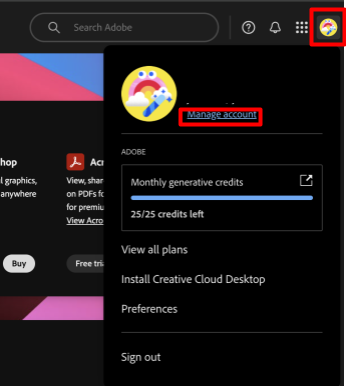
Navigate to Data & Privacy Settings
In the top navigation menu, click on Data and Privacy (or visit account.adobe.com/privacy directly).
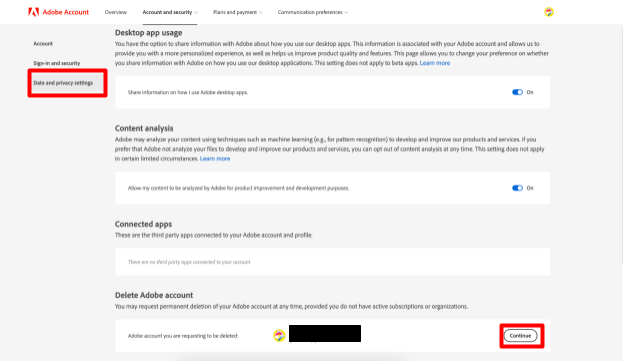
Click "Continue" Under Delete Adobe Account
Scroll down to the "Delete Adobe Account" section and click the blue Continue button.
Confirm Identity & Select Reason
For security, Adobe will prompt you to re-enter your password or confirm via Two-Step Verification. Choose your reason for deletion from the dropdown list and click Continue.
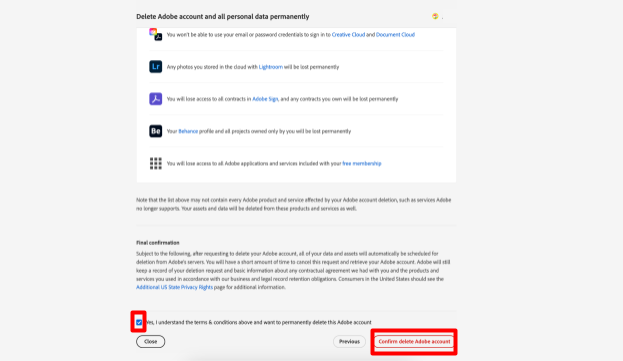
Accept Terms & Confirm Deletion
Review the final summary page. Check the box agreeing that you understand you will lose access to all Adobe cloud assets, then click Confirm Delete Adobe Account.
How to Delete School, Team, or Enterprise Adobe Accounts
If your Adobe account was assigned to you by an employer, university, or school, you will not see the "Delete Adobe Account" button.
- Why: Enterprise accounts are managed via the central Adobe Admin Console.
- Solution: You must contact your company or school IT Administrator and request that they delete your user profile from their organization's Adobe Admin Console.
Managing Targeted Advertising & Data Privacy Choices
Even after deleting an account, you can submit additional privacy requests under CCPA/GDPR to prevent Adobe from collecting data via cookies or marketing partners:
- Visit the Adobe Privacy Rights Portal.
- Select Opt out of targeted advertising and disable cross-site performance trackers.
Replace Adobe with One-Time Purchase Lifetime Software
Once you delete your Adobe account, you don't have to stop creating. Many industry-leading professional applications offer genuine one-time purchases with lifetime validity:
- Affinity Suite (Photo, Designer, Publisher): Complete pro-grade alternatives to Photoshop, Illustrator, and InDesign with zero monthly fees.
- DaVinci Resolve: Industry-standard video editing and color grading suite (powerful free version + lifetime Studio license).
- Browse Lifetime Deals: Explore genuine, verified lifetime licenses for Mac software and PC software at CDRBSoftwares.
Frequently Asked Questions (FAQ)
No. Adobe requires all active paid subscriptions to be canceled and all outstanding balances settled before the account deletion option becomes available.
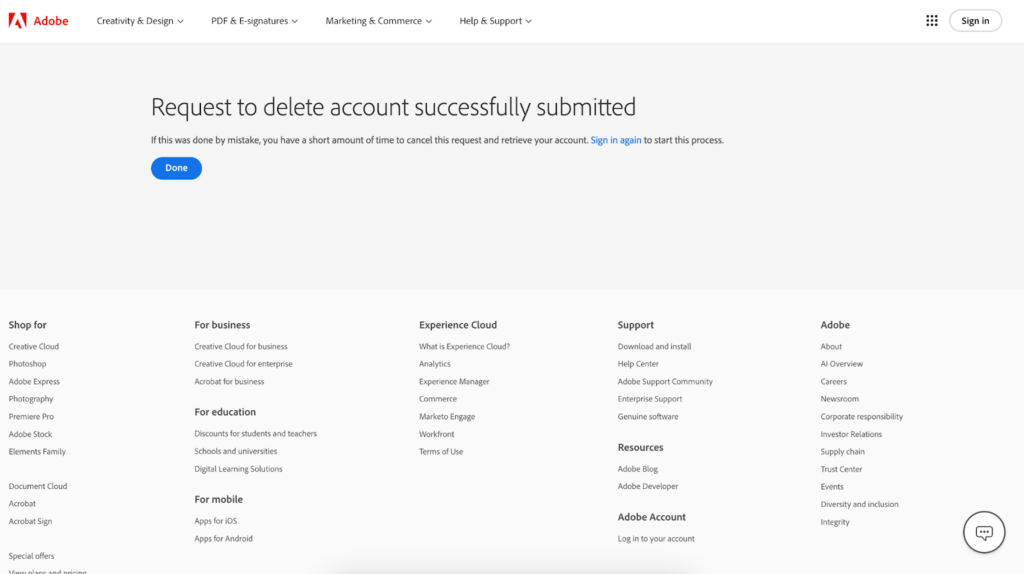
Adobe provides a short grace period (typically 7 to 14 days). If you sign into your account during this window, you will receive an option to cancel the deletion request and reactivate your profile.
All portfolios, published projects, and custom domains linked to your Behance or Adobe Portfolio profiles will be permanently taken down and deleted.
No. Any local files (.PSD, .AI, .PDF) stored on your local hard drive or external storage remain completely untouched. Only files stored in Adobe Cloud storage are deleted.